

Ever hosted a Google Meet and suddenly needed to pass the baton? Maybe you’re juggling multiple calls, a teacher handing off to a co-instructor, or a team lead stepping out unexpectedly. Understanding how to change the host—or more precisely, transfer full ownership or grant co-host privileges—ensures seamless transitions and keeps your virtual gatherings productive. In Google Meet, the “host” is the Calendar event owner, who holds ultimate control, including access to meeting artifacts like attendance reports. Co-hosts, on the other hand, get near-identical powers during the session but don’t automatically receive post-meeting data unless set up in advance.
This comprehensive 2025 guide draws from Google’s latest official updates, including enhanced host management features rolled out in June 2025 for better join request controls. We’ll cover everything from pre-meeting transfers to in-call promotions, tailored for personal, Workspace, and Education users. Let’s dive in.
Quick Overview: When You Can Change the Host
Not all scenarios allow a full host swap—Google prioritizes security and account types. Here’s a handy table to know your options at a glance:
| Situation | Can You Change the Host? | Method | Key Notes |
| Before the meeting (scheduled in Calendar) | Yes (full ownership transfer or pre-add co-hosts) | Edit event in Google Calendar > Change owner or Add co-hosts | New owner accepts via email (60 days); co-hosts up to 25 in eligible Workspace editions. Events with >200 guests can’t transfer. |
| During a live meeting | Partial (promote to co-host only) | Turn on Host Management > People > Grant host controls | No full ownership shift mid-call; co-hosts handle most tasks but artifacts go to primary host. |
| After the meeting ends | No | N/A | Reschedule via new Calendar event for transfer. |
| Personal Gmail account | Limited | Co-hosts only if enabled (rare) | No ownership transfer; creator must initiate. Host Management unavailable. |
| Google Workspace / Education | Full access | As above | Supports 25 co-hosts in Business Standard+, Enterprise, Education editions. Admins set defaults. |
Step 1: Change the Host Before the Meeting (Calendar Method)
For a permanent handover, transfer event ownership in Google Calendar—this makes the recipient the primary host for the Meet link. It’s ideal for recurring series or long-term shifts. (Note: This works best on desktop; mobile has limited edit options.)
Prerequisites
- You must own the event.
- The event can’t have over 200 guests.
- Recipient needs a Google account.
Step-by-Step Guide
- Open Google Calendar on your computer.
- Click the event you own to open its details.
- In the top right, click the three dots (More options) > Change owner.
- Enter the new owner’s email address and add an optional message.
- Click Change owner to send the request.
The new owner receives an email with an acceptance link—they have 60 days to claim it. Until accepted, you’re still the host. Once done, Meet policies (like recording permissions) follow the new owner’s settings.
Adding Co-Hosts Pre-Meeting (Shared Control Option)
If you prefer collaborative hosting without full transfer:
- In the event edit view (click pencil icon), ensure Add Google Meet video conferencing is on.
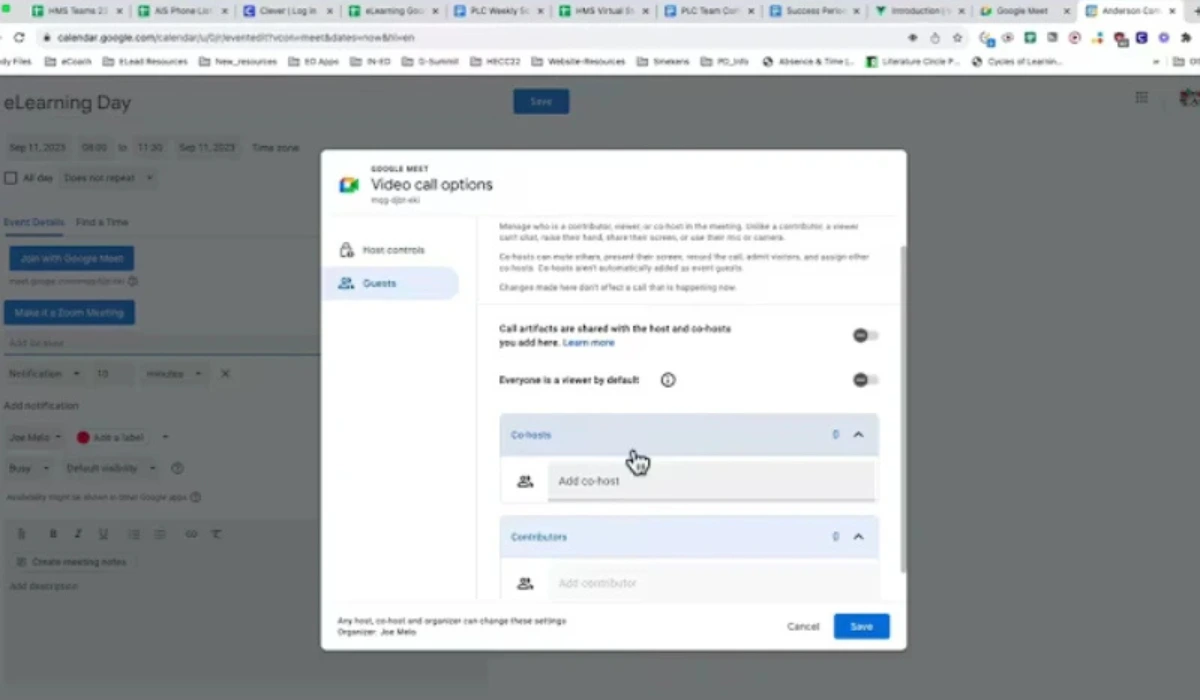
- Click More options > Video call options.
- Toggle Host management on (if off).
- Under Co-hosts, click Add people, enter emails, and check Share meeting artifacts if you want them to get reports/polls.
- Click Save.
For recurring events, repeat for each instance or the series—co-hosts don’t auto-carry over.
Pro Tip: Transfer ownership early to avoid last-minute scrambles. If the meeting includes a Meet link, the new host inherits all video policies, like who can present or record.
Step 2: Change the Host During a Google Meet (Co-Host Promotion)
Mid-meeting full transfers aren’t possible—Google doesn’t allow ownership swaps once the call starts. Instead, promote participants to co-hosts via Host Management. This grants them robust controls, making it feel like a true handover for the session’s duration. Available in supported Workspace editions; personal accounts skip this.
Prerequisites
- Host Management must be enabled (toggle in settings).
- Participant must be in the meeting.
- Up to 25 co-hosts total.
Step-by-Step Guide
- Join the meeting at meet.google.com or via the app (desktop for easiest access).
- If not on, enable Host Management: Click More options (three dots) > Settings > Host controls > Toggle Host management on.
- Click the People tab in the bottom toolbar to view participants.
- Hover over (or tap) the desired participant’s name > Click More options (⋮) > Make co-host.
- Confirm the prompt—they’re now promoted!
Co-hosts can immediately mute/unmute, lock chat/presentation, admit guests, start recordings, and manage breakout rooms (if pre-set). To revoke: Repeat > Remove as co-host.
On mobile (iOS/Android app): Tap screen > More controls > Host controls > Follow similar steps under People.
Example: Imagine a sales demo where the lead rep’s connection drops. With a pre-promoted co-host, they seamlessly take over screen sharing and Q&A—no restarts needed. In a June 2025 update, hosts can now fine-tune join requests (e.g., restrict to trusted domains), adding extra security during these shifts.
Step 3: Troubleshooting and Permissions
Bumping into barriers? Google Meet’s features hinge on your account and admin settings. Here’s how to diagnose:
- No “Change owner” option: You’re not the event owner, or it exceeds 200 guests. Create a new event instead.
- Host Management unavailable: Limited to Workspace/Education (not personal Gmail). Upgrade or use Calendar co-host adds as a workaround.
- Can’t promote co-hosts: Toggle Host Management on first. In Breakout Rooms, return to main session—promotions don’t work inside rooms.
- Admin restrictions: Workspace admins control defaults via Admin console > Apps > Google Workspace > Meet > Meet video settings > Host management. Request they enable co-hosting or artifact sharing.
- Mobile glitches: Full ownership transfers require desktop Calendar; use app for in-call promotions only.
- External guests as co-hosts: Possible, but they need promotion for recording if Host Management is on.
For school accounts (Education), teachers auto-get co-host perks in Classroom-integrated Meets.
Common Mistakes (and Quick Fixes)
Even pros slip up—avoid these pitfalls with these fixes:
| Problem | Why It Happens | Quick Fix |
| “Make co-host” option missing | Host Management off or unsupported edition | Enable in Settings > Host controls; confirm Workspace eligibility. |
| New co-host can’t access recordings/artifacts | Added mid-meeting or no pre-check | Add via Calendar beforehand and select “Share artifacts”; manually forward reports post-call. |
| Transfer email not received | Spam filter or typo | Resend from Calendar > Edit > More > Change owner; check junk folder. |
| Recurring event co-hosts reset | Doesn’t auto-apply to series | Re-add per instance or transfer ownership for the whole series. |
| Host leaves, controls freeze | No co-hosts appointed | Always promote backups early; rejoin if possible to resume. |
FAQs
Can there be multiple hosts in Google Meet?
Yes—up to 25 co-hosts in supported editions. They share controls like muting and ending the meeting, but only the primary host auto-receives artifacts unless pre-configured.
Can I remove the original host completely?
Not fully—transferring ownership demotes you to guest, but you retain Calendar edit access unless revoked. Co-hosts can’t strip primary status.
How do I make someone a co-host?
Pre-meeting: Calendar edit > Video options > Co-hosts > Add. In-meeting: People > ⋮ > Make co-host (after enabling Host Management).
Can I change the host from my phone?
Partial—promote co-hosts via the Meet app, but full ownership transfer needs desktop Calendar.
Why can’t I see host controls?
Personal account, Host Management off, or admin-disabled. Switch to Workspace and toggle on in settings.
What happens if the host leaves early?
Meeting persists; co-hosts inherit controls. Recordings pause if no one has permission—rejoin or promote quickly to continue.
Do co-hosts get meeting reports?
Only if added pre-meeting in Calendar with artifact sharing checked. Mid-meeting promotions exclude them from that session’s data.
How does the 2025 join request update affect this?
Hosts can now restrict “ask to join” to specific groups, enhancing security when transferring controls mid-call.
For more on capturing your sessions, see our step-by-step tutorial on how to record in Google Meet.
Explore more practical tech tools and tutorials at TheDigitalHowTo.com — including our IP Checker, Advanced IP Scanner, XML Sitemap Extractor, and Password Generator — designed to make your workflow faster, safer, and smarter.